
AyeBrowse
Download
Zero telemetry · Windows and macOS

Your browser does not need to know you.

AyeBrowse collects no usage data and sends no telemetry or background check-in pings. It is a deliberately simple desktop browser that shows you what pages are trying to contact—and gives you practical control over it.

Nothing to reportNo telemetry, usage analytics or passive update polling.
Nothing hiddenBlocked and allowed connections stay visible to you.
Nothing lingeringClosed tabs close; inactive tabs give resources back.

Independently built, end to end

Free should not mean paying with your data.

With many free products, the real price is what they can learn about you. There is genuinely no such catch with AyeBrowse. It does not send browsing history, searches, open tabs, usage events or “essential” telemetry to a server.

The browser and its supporting services were built by one independent developer. Signed updates come directly from AyeBrowse. Optional weather and IP/network tools contact AyeBrowse only when you ask for them and return the answer to your browser; they do not report how you browse. A contact message is sent only when you deliberately submit it.

Control that is useful, not theatrical.

AyeBrowse focuses on the parts of browser privacy that affect real connections, real data and real attack surface.

A firewall made for browsing

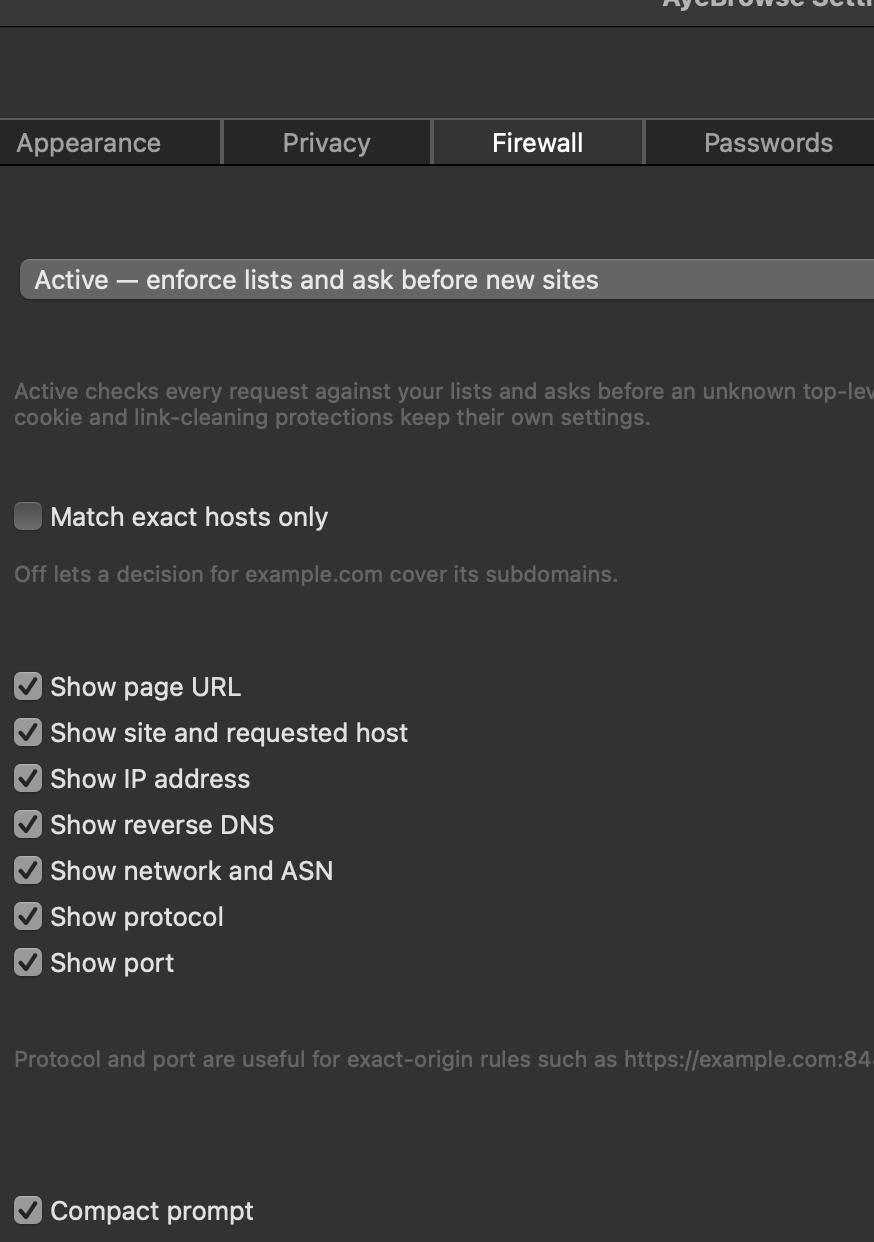
Active mode can ask before an unknown host is contacted, remember your answer for a chosen duration, and show exactly what a page reached or was refused. Simple rules can be as direct as google; local lists, hosted community lists and firewall decisions work together. “Allow what this page needs” still keeps analytics, telemetry and ad-tech hosts blocked.
Actually zero telemetry

AyeBrowse does not collect how you use it. There is no analytics service, crash-reporting upload, startup check-in or scheduled background update request.

Break the tracking chain

Tracking parameters are removed and known Google, Facebook, Reddit and other link shims are unwrapped locally, so the browser can go to the destination without visiting the tracking redirect.

Connection integrity

HTTPS-only browsing, certificate inspection, scoped certificate exceptions, service-key pin status and DNS-hijack testing make suspicious connections visible instead of quietly accepting them.

Private tabs that really leave

Ephemeral tabs have their own off-the-record profile. Closing one destroys its cookies, storage and cache rather than leaving a “private” session hanging around.

Resources follow your attention

Inactive tabs suspend timers, animation and video decoding unless they are loading or playing audio. Closing a tab closes its work instead of keeping a collection of lingering helpers alive.

Vaultwarden, without page-load autofill

An optional settings-integrated bridge connects to Bitwarden-compatible Vaultwarden servers. Matching logins are offered deliberately; credentials are not sprayed into forms automatically or submitted for you.

Less attack surface

Printing means producing a document—not talking to printers or CUPS. Camera, microphone, location, notifications and other powerful capabilities are straightforward settings rather than assumptions.

Tools belong to the user

A built-in console, task manager, network activity view, source viewer, web inspector, browser import and a direct bookmark manager keep useful diagnostics inside the browser.

Your home, not an ad surface

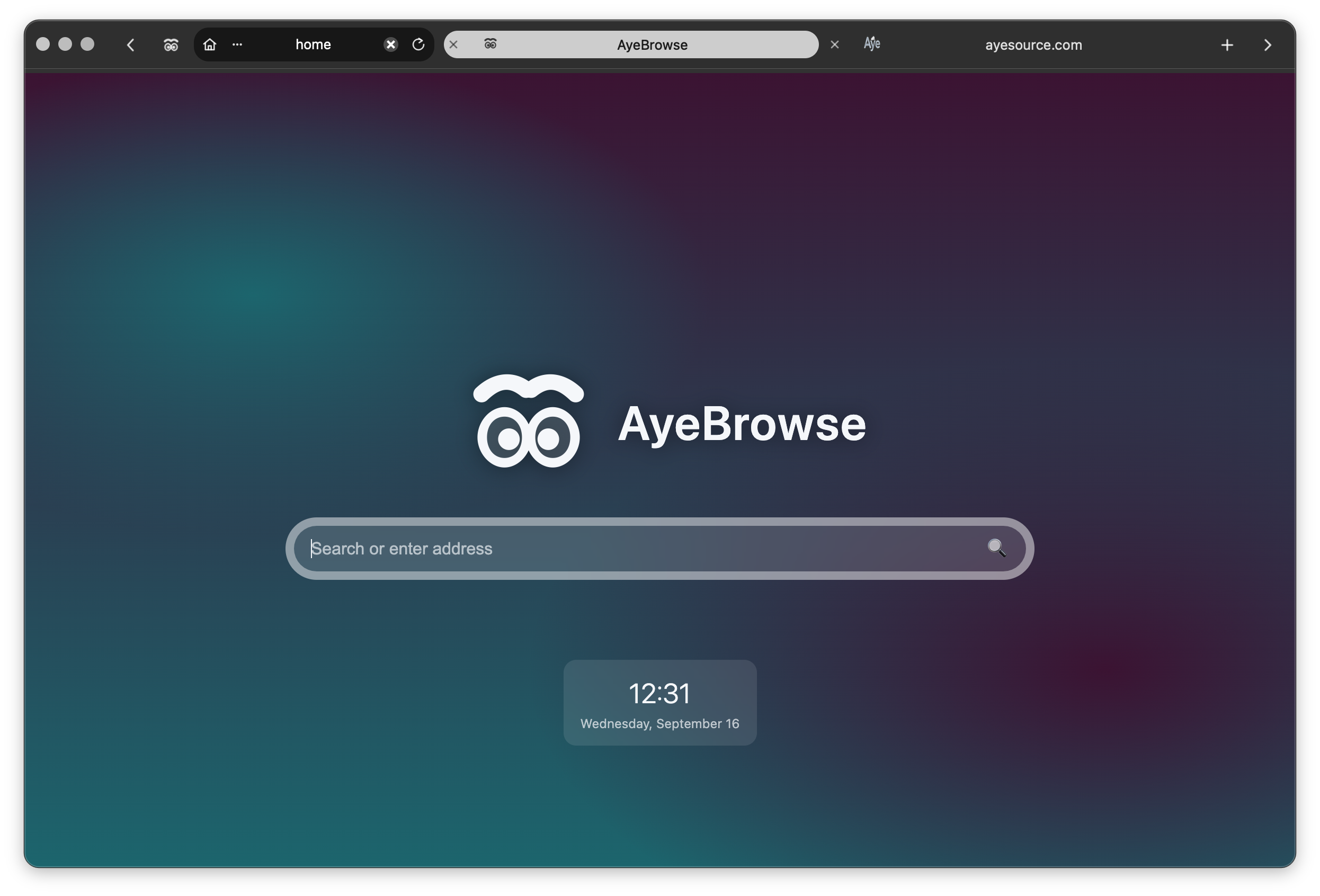
The local home page is extensively customizable, with your bookmarks and optional weather and IP/network information—not sponsored links or engagement feeds.

The tab becomes the address bar

Double-click the text in any tab and it transforms into a URL and search field. Navigation stays exactly where its context already is instead of consuming another permanent toolbar.

The controls are not buried.

These are real AyeBrowse settings—not concept art. Network decisions and connection checks are readable, local and under your control.

AyeBrowse desktop window showing its customizable local home page and compact tab-based navigation
Your browser, without somebody else's feedA clean local home page, compact navigation and the information you choose—without sponsored links, engagement bait or an advertising profile.
AyeBrowse firewall settings showing active enforcement and the connection details that can appear in a firewall prompt
A firewall you can actually readAsk before new sites connect and choose whether prompts show the page, requested host, IP address, reverse DNS, network, protocol and port.

Get AyeBrowse

Version 0.2.6 — released 2026-09-15

AyeBrowse 0.2.6 Full release notes

Verify a download manually

AyeBrowse verifies in-browser updates against its signed manifest. For a fresh installation, compare the checksum shown here after downloading.

AyeBrowse-installer.pkg
332144b237e37c862081616596e1239a10ecde3f45ba6d35ba7ac796f08c0e00

AyeBrowse-installer.exe
03f3876ff7795273feb4eca1ad5638a5a51a5d0dc84c2b68c15633b30169f5d5
This page loads no third-party scripts, fonts, or cookies. Download links are single-use and expire after two minutes.